


Next.js OG images for every route
One generateMetadata function in the App Router. Every route passes its own path — static, dynamic and catch-all.
Make your preview
Paste your site, pick a design and publish. Open Add to site → Next.js — the snippet already has your site ID.
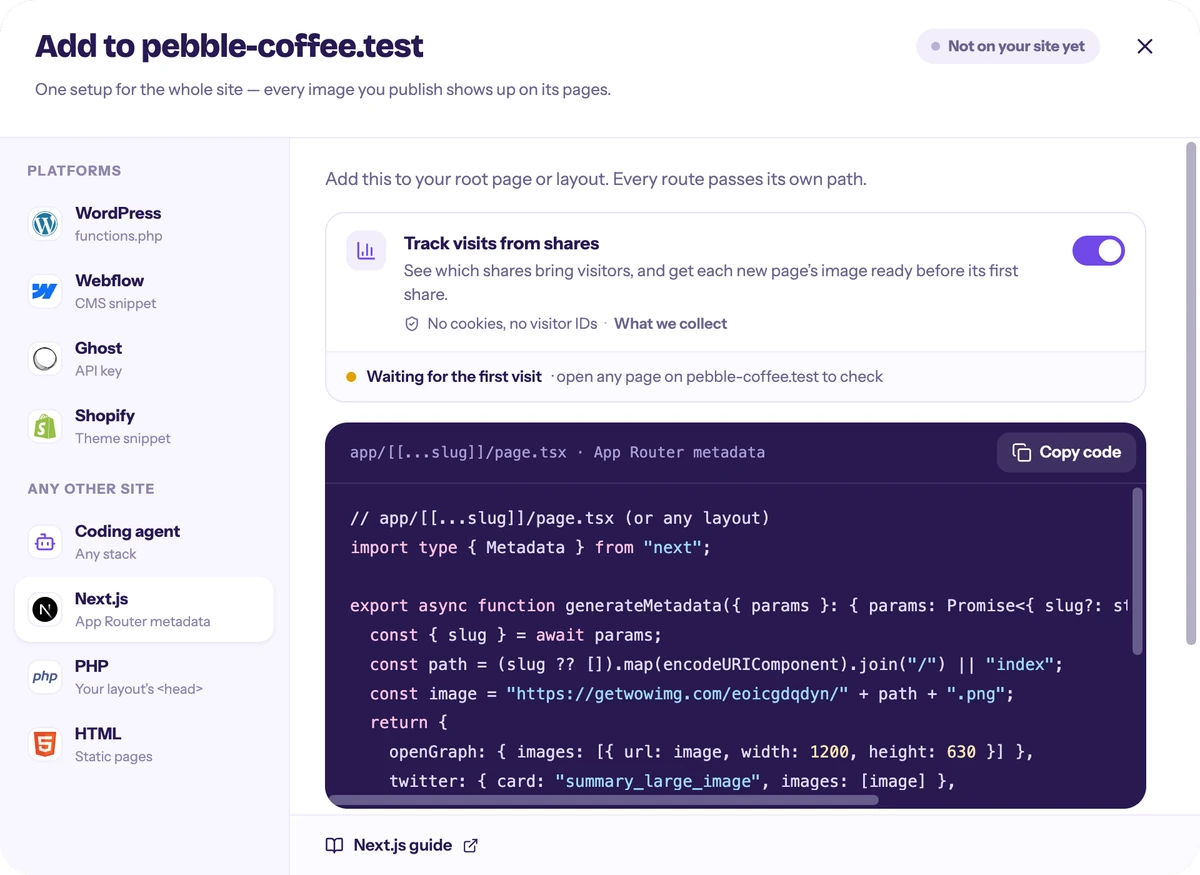
Add generateMetadata
Put it in the root catch-all page, or in each route’s page.tsx. Remove other openGraph.images you set.
// app/[[...slug]]/page.tsx (or any layout)
import type { Metadata } from "next";

export async function generateMetadata({ params }: { params: Promise<{ slug?: string[] }> }): Promise<Metadata> {
  const { slug } = await params;
  const path = (slug ?? []).map(encodeURIComponent).join("/") || "index";
  const image = "https://getwowimg.com/a1b2c3d4e5/" + path + ".png";
  return {
    openGraph: { images: [{ url: image, width: 1200, height: 630 }] },
    twitter: { card: "summary_large_image", images: [image] },
  };
}
a1b2c3d4e5 is a sample site ID — Add to site gives you the code with yours.Pages Router?
Add the same og:image and twitter tags inside <Head>, building the path from router.asPath. Statically optimised dynamic routes see the route pattern at build time, so use it on pages with getStaticProps or SSR — or the App Router snippet.
import type { AppProps } from "next/app";
import Head from "next/head";
import { useRouter } from "next/router";

export default function App({ Component, pageProps }: AppProps) {
  const { asPath } = useRouter();
  const path = asPath.split(/[?#]/)[0].replace(/^\/+|\/+$/g, "") || "index";
  const image = "https://getwowimg.com/a1b2c3d4e5/" + path + ".png";
  return (
    <>
      <Head>
        <meta property="og:image" content={image} key="og:image" />
        <meta name="twitter:card" content="summary_large_image" key="twitter:card" />
        <meta name="twitter:image" content={image} key="twitter:image" />
      </Head>
      <Component {...pageProps} />
    </>
  );
}
a1b2c3d4e5 is a sample site ID — Add to site gives you the code with yours.Optional: see what your shares bring
Keep the visit script and Analytics counts the visits your shared links bring, and from which apps: X, LinkedIn, Facebook, WhatsApp, Telegram. A new page also gets its image on its first visit, before anyone shares it. No cookies, no visitor IDs. The snippet adds it to your root layout while Track visits from shares is on in Add to site, as it is by default.
<Script src="https://getwowimg.com/v.js" data-site="a1b2c3d4e5" strategy="afterInteractive" />a1b2c3d4e5 is a sample site ID — Add to site gives you the code with yours.Before and after
Questions
Does it work with static export?
Yes. The image URL is computed at build time; the image itself is rendered by us on request.
What about opengraph-image.tsx?
Remove it for routes that should use getwowlink, otherwise Next.js adds a second og:image.
Will it slow down my pages?
No. It’s one string per page; the image is served from our CDN.
Try it on your site
Three designs made from your site — no sign-up to try.
